

Start with the bigger picture
Review recorded assets and debts together, then look at the entries behind the figures when a detail needs checking.
Explore the dashboardFinancial organisation & spreadsheet alternatives
Connect your properties, investments, mortgages, super and commitments in one structured record. Keep the context alongside the figures, with a dashboard you can return to and update.

Start with your situation
Your records may span lenders, investment platforms, super providers, business interests and household commitments. A custom spreadsheet can bring some figures together, but its notes, formulas and document links also need maintaining. If the structure is hard to follow, another person may struggle to understand the picture you have built. Financial Portfolio offers a different way to organise those connected records.
Custom tabs, formulas and file references need checking as your records change.
Statements and current figures remain with different providers, even when you want a consolidated view.
Fragmented or outdated entries can make the overall recorded picture difficult to interpret.
Contracts, statements and policies can become detached from the records they explain.
See the connected record
Financial Portfolio brings recorded assets, debts, ownership relationships, commitments and documents into one structure. Use the dashboard to review the overview and available reports to support a conversation. Values remain primarily user-maintained; this is not a live bank-feed service or a replacement for accounting and modelling software.
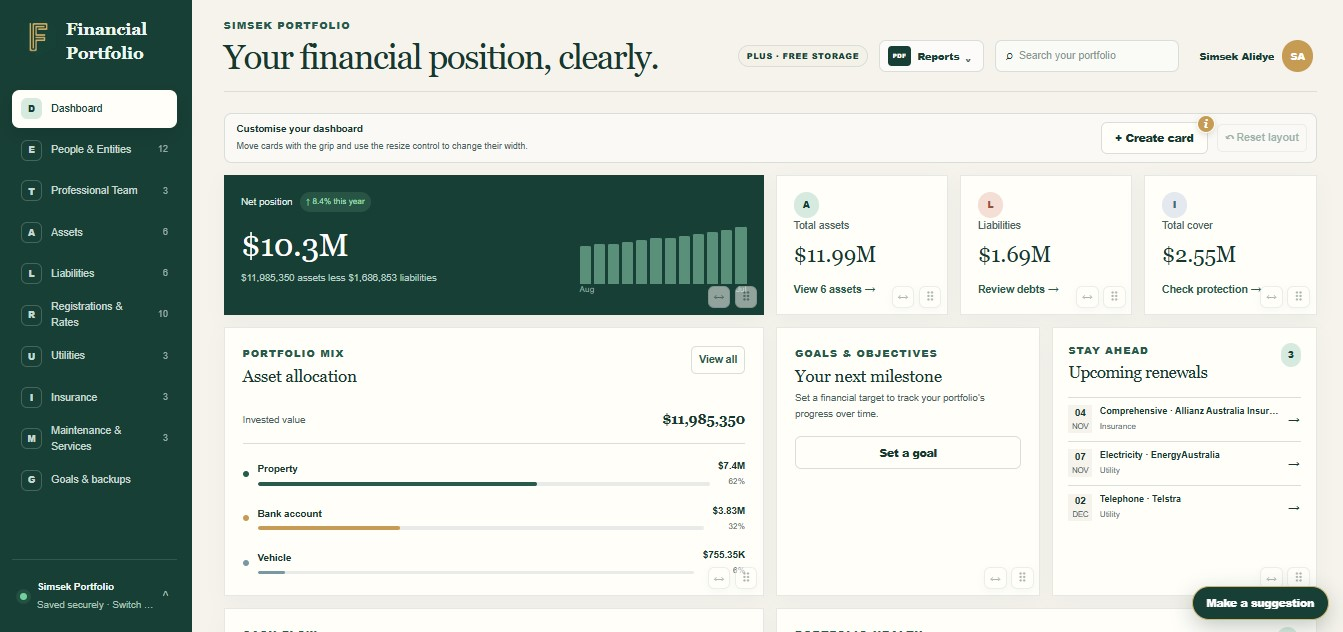
Useful connections
Review recorded assets and debts together, then look at the entries behind the figures when a detail needs checking.
Explore the dashboardPlace supporting paperwork beside the asset, liability or policy it explains, so a number has a useful reference.
Explore document recordsRecord relevant recurring costs and renewal details. Use the information as part of your own review routine; do not assume automatic renewal emails.
Explore commitments and renewalsUse reports and, with Portfolio Plus, selected viewer access to support a conversation. Choose carefully what information and documents to share.
See the reporting optionsFeature breakdown
| Feature | What it does | Why the connection matters |
|---|---|---|
| Net worth dashboard | Summarise recorded assets less liabilities. | Review the overview without building your own summary formulas. |
| People and entity records | Connect assets to people, companies and trusts. | Keep recorded relationships clear without implying tax or asset-protection advice. |
| Commitments and renewals | Organise recurring costs, provider information and renewal dates. | Support your own checks; the app does not pay bills or prevent duplicate charges. |
| Document vault and reports | Link supporting files and prepare available summaries. | Keep useful context ready for an accountant or adviser conversation. |
Access and privacy
Enter values from your own provider information and update them when needed. You do not need to share bank credentials with Financial Portfolio to create your record. That does not remove every security risk: protect your sign-in, keep sensitive credentials out of your notes and choose viewer access carefully.
Understand access controlsRead the privacy policyTry a free tool
Use the free Subscription Cost Calculator to compare the monthly and annual cost of subscriptions you enter. It helps you review the totals; it does not detect charges in bank accounts or cancel subscriptions.
Review subscription costsHow to get started
Begin with a useful set, such as your home and loan or savings and investments. Gather the current information instead of trying to enter everything at once.
Add relevant people or entities, assets and debts. Link supporting documents so the records make sense beyond a row of figures.
Review the dashboard or a report for missing entries, duplicate amounts and old values. Correct the records before passing a summary on.
Use a new statement, renewal or change in circumstances as a cue to review the relevant records. Choose a regular review reminder in your own calendar if helpful.
Keep the purpose clear
If a spreadsheet works well for modelling or custom calculations, you may still want it for that job. Financial Portfolio focuses on connecting the financial records and supporting details. Start with the information you repeatedly need to find, then decide how the app fits alongside the tools and professional relationships you already use.
This is a manually maintained wealth tracker and record organiser, not an automatic bank-feed service, accounting package or transaction-budgeting app. There is no promised setup time or guaranteed time saving; the value depends on the records you keep useful.
 FINANCIAL PORTFOLIO
Free forever for personal use
One portfolio, 25 MB of document storage, built-in fields, dashboard and reports.
Portfolio Plus adds up to five portfolios, 250 MB of storage, custom fields and viewer access.
Try Plus free for three months, with no credit card required. Then choose A$79 a year or A$7.99 a month if you want to subscribe. We will email you before the trial ends.
Keep the picture connected
Choose the resource that helps you put this into practice.
No. Values are primarily maintained by you, and automatic bank-transaction imports are not a current feature. Use your provider’s current information to review and update the relevant records.
No. Begin with the records that would benefit from clearer links to people, debts or documents. Keep a spreadsheet for modelling if that suits you. The app is not a general-purpose formula engine.
It depends on the records you want to organise and whether the information is ready. Start with a small, useful set and add more gradually. There is no fixed setup-time promise.
The app provides reports and summaries from recorded information. Review the entries and the information included before sharing a report. Viewer reports are limited by permissions. A report is not an independently verified tax return or accounting record. See reports and restore points.
You can record commitments and renewal dates, but should not rely on automatic renewal emails. Keep your own reminder process and use the records as supporting information.
Yes. Portfolio is free forever for personal use, with one portfolio, 25 MB of document storage and built-in fields. Portfolio Plus has a three-month free trial with no credit card required. After the trial you can choose A$79 a year or A$7.99 a month. Compare the plans for the inclusions.
Start with what you have
Bring the details together in a structure you can maintain and explain.