
Before a policy review
Locate the current schedule, renewal information and covered asset. Bring those records to the insurer or qualified adviser if you have questions about the terms or adequacy of cover.
The best checklist is short enough to use and specific enough to find the right file. Choose the record types you have, then see which supporting documents and dates are worth checking.
Inputs stay in this browser tab and clear on reload. Download if you want to keep a copy.
Select a category to build your checklist.
A record-keeping aid based on your entries; it does not verify documents or legal authority. General information, not personal financial, tax or legal advice.
Follow the tool, step by step
Choose a guide below. Follow the labelled screenshot, then try it with your own information.
Step 1 of 3
Select Property, Loans, Superannuation, Investments, Insurance or Company or trust. Pick only the categories relevant to your records. Your checklist updates as you select or remove a category.
Try this in the tool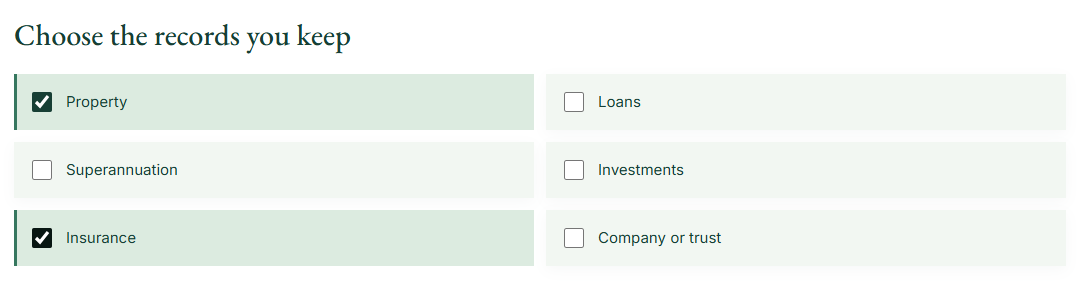
Step 2 of 3
Use the list to find current statements, schedules and ownership references. The public tool needs no document upload. Check the issuer and version rather than assuming the first file you find is current.
Try this in the tool
Step 3 of 3
Download the checklist as a CSV. In your own spreadsheet, fill in Storage location, Version date, Contact and Checked. Store that completed file somewhere appropriate for the information it contains.
Try this in the tool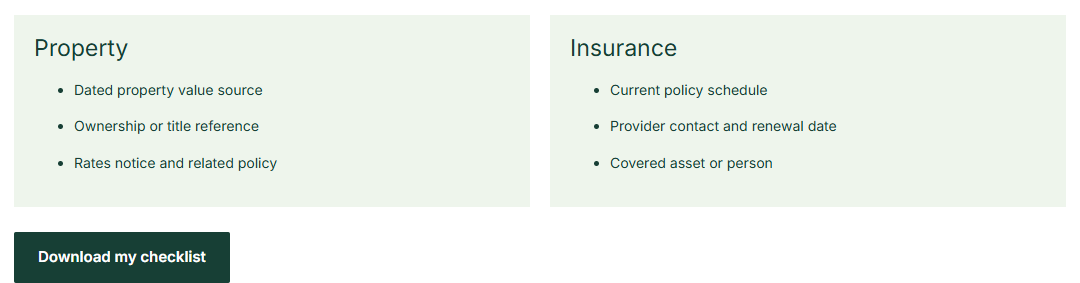
Worked example
Selecting these two categories creates three prompts for each. You can refer to the same policy schedule where it supports both records. The checklist helps you locate and date information; it does not assess whether the insured sum or policy cover is suitable.
Follow the inputs

 FINANCIAL PORTFOLIO
 Related financial recordDate and selected access
Take the next step with Financial Portfolio
Use Financial Portfolio to attach supporting documents to the asset, liability or policy they explain, within the applicable file and storage limits. Keep the record and its context together, and share a document explicitly when a viewer needs it.
App access is currently through the waitlist. Keep your download for reference. Tool entries are not sent to the app or imported automatically.
Start with property, loans, super, investments, insurance and any company or trust records relevant to you. For each item, record the file name or safe storage location, the date of the latest version, and the person or institution to contact. Never enter account passwords or identity-document numbers into a public checklist. Use Financial Portfolio's document vault if you later want the files beside their related records, subject to its format and storage limits.
For home insurance, the checklist can ask for the current policy schedule, insurer contact, renewal date and the property it covers. It should not tell you whether the cover is adequate. For estate preparation, Services Australia provides a wider list of practical arrangements.
The tool runs in this browser tab. Your inputs are not sent to Financial Portfolio, stored in a user account or passed through the signup link. A reload clears the working state. Download a CSV if you want a copy, and keep it somewhere appropriate for the information it contains.
Financial Portfolio can help you maintain related records, but this public result does not create a portfolio or verify a source document. Read the privacy policy and terms of use, or visit the Help Center for product questions.
Put the result to work
Locate the current schedule, renewal information and covered asset. Bring those records to the insurer or qualified adviser if you have questions about the terms or adequacy of cover.
Start with one category, confirm which file is current and note its safe location. Add other categories gradually so the resulting list stays usable instead of becoming another folder no one understands.
Keep current statements and policy schedules with the asset, debt or policy they explain. The exact set depends on your circumstances.
Review it when a policy changes or renews, and when the underlying asset or beneficiary information changes.
No. It helps record and locate information; suitability questions belong with the relevant insurer or qualified adviser.
From a useful start to connected records
Explore how Financial Portfolio connects the assets, debts, people and paperwork you maintain.